
Summary
Grammy used a free AI tool to create a video of herself, then walked her audience through the platforms making synthetic human video shockingly easy to produce. The post explains how avatar tools like D-ID, HeyGen, and Creatify work, what AI-generated faces look like at scale, and how to protect yourself when a video feels "off."
That Video You Just Watched? Part of It Was AI.
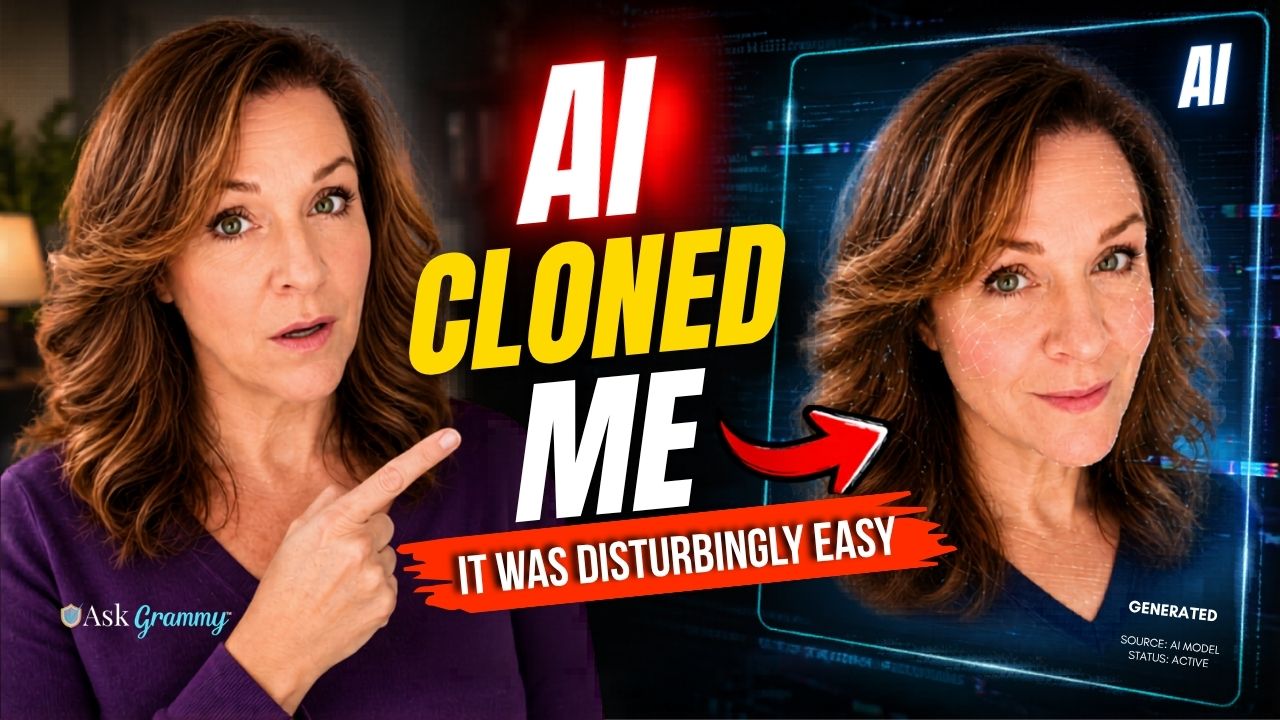
If you came here from my latest video, you already know what I did.
I used a free AI tool to create a video of myself – a version of me that blinks, smiles, gestures, and delivers a message in what sounds like my voice. Then I showed up on screen beside her and revealed the whole thing.
If you haven’t watched the video yet, I want you to do that first. Because reading about it is one thing. Seeing it is something else entirely.
Prefer to read? Keep scrolling. Everything in the video is covered below.
Why I Did This
I did not create that AI version of myself because I wanted to. I did it because I needed you to see – with your own eyes – how easy this technology has become.
We are not talking about Hollywood special effects or expensive production studios. I put that clip together in under an hour using a free account on a site called D-ID. No film crew. No technical expertise. Just a photo, a script, and a few clicks.
That is the part that should stop you cold.
Because if I can do it, so can anyone else. Including the people who are not going to tell you that is what they did.
What You Saw in the Cold Open
The video opens with an AI-generated version of me delivering one line:
“AI tools can now create a person who looks familiar, speaks naturally, blinks, smiles, gestures, and delivers a message that sounds completely believable.”
As she finishes that line, the real me appears on screen beside her.
You can see the watermark on the AI clip. That is there because I used the free version of D-ID and had no intention of paying for a subscription. I have no plans to give you AI-generated content – ever. You will always see me in person. Bad hair days, bags under my eyes, and all.
The watermark, in this case, is actually a useful teaching tool. In the real world, the people using these platforms to deceive you will not be using the free version. There will be no watermark. The video will look clean, professional, and completely real.
The Platforms That Make This Possible
In the video I walk through three platforms that are currently making AI-generated human video accessible to anyone with an internet connection. Here is a quick overview.
D-ID
D-ID is the platform I used to create my own AI clip. You upload a photo – of yourself, of anyone – type in a script, and D-ID generates a video of that person delivering your message. The results are remarkably polished, even on the free tier.
D-ID also maintains a gallery of pre-built AI avatars – hundreds of synthetic human faces available to any subscriber. When I scrolled through that gallery in the video, the reaction in the comments said it all. People found it fascinating and deeply unsettling at the same time. That is the right reaction.
HeyGen
HeyGen operates on the same basic concept. Choose an avatar or upload your own likeness, provide a script, and receive a finished video. HeyGen is widely used by legitimate businesses for training videos and marketing content, and I want to be fair about that. Legitimate use cases exist.
But it is also being used to create fake spokespeople, fabricated testimonials, and synthetic versions of real people – without their knowledge or consent.
Creatify
Creatify is similar in capability, with a focus on marketing and advertising content. Again, legitimate uses exist. And again, the potential for misuse is significant.
The point is not that these platforms are evil. The point is that they exist, they are easy to use, and most people have no idea they are out there.
Those Faces You Saw – They Are Everywhere
One of the most striking moments in the video is the slow scroll through D-ID’s avatar gallery.
Hundreds of faces. All of them generated entirely by artificial intelligence. None of them have ever lived anywhere, had a conversation, or known another person.
And yet they look completely real.
Here is why that matters. Those faces – and thousands like them – are already showing up in your social media feed. In product reviews. In financial advice videos. In testimonials for supplements, investment platforms, and online courses.
The person on screen was never born. But they are talking to you like they were, and they have something to sell.
How to Protect Yourself
You do not need to become a technology expert to protect yourself from AI-generated video. You just need to know what to look for. Here are four things to keep in mind.
1. Watch the edges. AI-generated faces often show subtle glitches around the hairline, ears, and the outer edges of the face, especially when the person moves. Backgrounds may shift or blur in ways that do not quite add up. It is getting harder to spot as the technology improves, but it is still there if you look deliberately.
2. Listen to the voice. AI voices have improved dramatically, but they still tend to sound too smooth. Too even. Real human speech has texture – small stumbles, natural variation in pace and energy. If the voice sounds like it was ironed flat, pay attention to that feeling.
3. Watch the eyes and mouth. Blinking patterns in AI video can be irregular – either too frequent or too infrequent. Lip sync sometimes lags or looks slightly disconnected from the audio. These are small things, but your brain often notices them before you consciously register what is wrong. Trust that instinct.
4. Ask yourself why this person is talking to you. This is the most important one. If a video features a celebrity, a financial expert, or a polished spokesperson telling you to buy something, send money, or act quickly – stop. Go find that person on their verified official channel and confirm they actually said it. If you can only find the video in one place, that is a red flag worth taking seriously.
The Bottom Line
The same tools I showed you in this video – the ones I used to make an educational demo – are being used by scammers right now to create fake celebrity endorsements, fabricated financial advice, and synthetic versions of people you already trust.
They are counting on you not knowing these tools exist.
Now you know.
I see us – me and all of you – as a growing army of scam busters, pissed off and human to our cores, who are taking the time to learn what we can about scams, to keep ourselves and the people we love safe.
If this post helped you, share it with someone who needs to see it.
About This Investigation
This post is based on firsthand testing of AI avatar platforms including D-ID, HeyGen, and Creatify. Grammy created an AI-generated video of herself using D-ID’s free tier to demonstrate the accessibility of this technology. No sponsored content or affiliate relationships exist with any platform mentioned in this post. All opinions are Grammy’s own.
Have you spotted an AI-generated video in the wild? Drop a comment below and tell me about it.